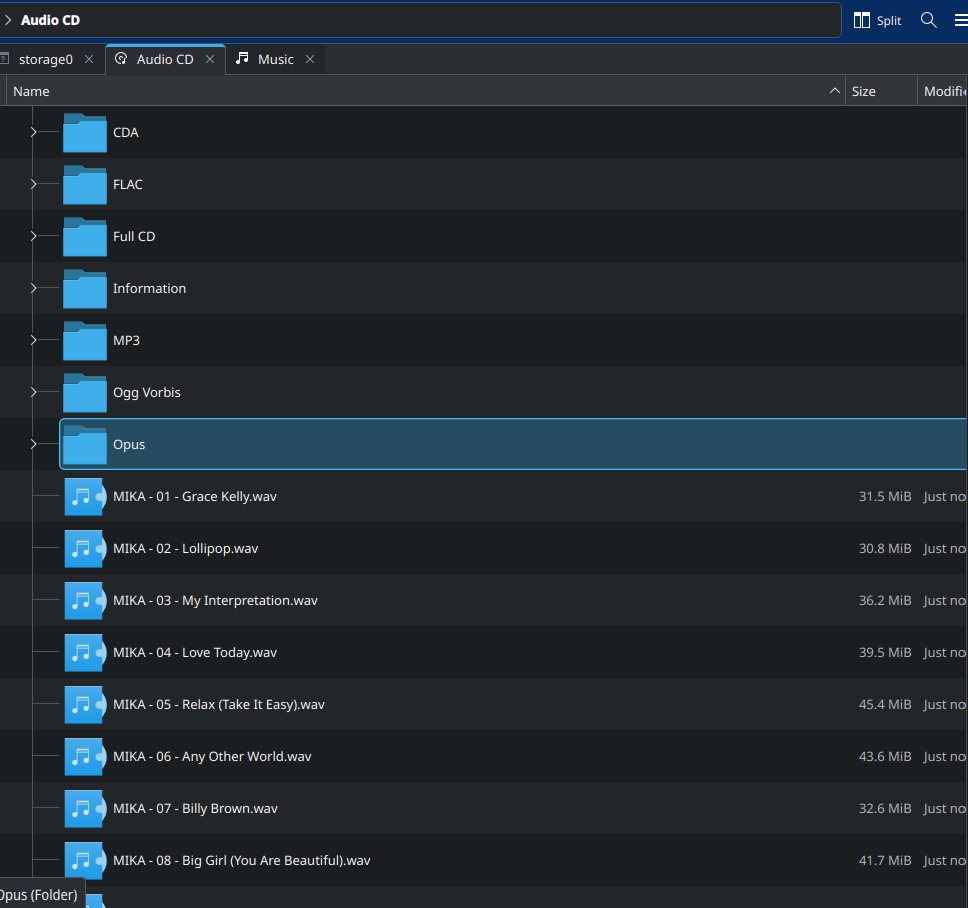
#TIL that you can rip an audio CD in #KDE just by opening it in dolphin and copying out the folder named for the format you want it in.
-
#TIL that you can rip an audio CD in #KDE just by opening it in dolphin and copying out the folder named for the format you want it in.
These are a set of virtual folders that represent the formats supported by your system to rip them into.
How cool is that?
#audiocd #ripping #music #opticaldisc #Linux #tech #deadformats
@gnuplusmatt I was very surprised the first time I saw that, I thought the producer of the CD had added the files in different formats

A really cool thing from KDE, but who still uses audio CDs? -
@gnuplusmatt I was very surprised the first time I saw that, I thought the producer of the CD had added the files in different formats
A really cool thing from KDE, but who still uses audio CDs?@AurelDel I thought so too, the first one I did today was the newest CD I own (which admittedly was from 2013), and then realised that OPUS is a newer codec than the disc

I am sick of paying Google to stream the same 300-400 songs over and over so I am re-ripping my old CD collection to put into my jellyfin - then will acquire the other tracks I dont own by either hunting down discs or other means
-
#TIL that you can rip an audio CD in #KDE just by opening it in dolphin and copying out the folder named for the format you want it in.
These are a set of virtual folders that represent the formats supported by your system to rip them into.
How cool is that?
#audiocd #ripping #music #opticaldisc #Linux #tech #deadformats
@gnuplusmatt Thanks thats indeed very useful!
For those like me who never opened a CD on their system before, the #KDE package "kio-audiocd" is needed for opening Audio CDs in dolphin, which for some reason is called "audiocd-kio" in the #Arch extra repository.
-
#TIL that you can rip an audio CD in #KDE just by opening it in dolphin and copying out the folder named for the format you want it in.
These are a set of virtual folders that represent the formats supported by your system to rip them into.
How cool is that?
#audiocd #ripping #music #opticaldisc #Linux #tech #deadformats
-
#TIL that you can rip an audio CD in #KDE just by opening it in dolphin and copying out the folder named for the format you want it in.
These are a set of virtual folders that represent the formats supported by your system to rip them into.
How cool is that?
#audiocd #ripping #music #opticaldisc #Linux #tech #deadformats
@gnuplusmatt CDs continue to be the only way to actually own a copy for most music (with digital releases, publishers always fall for the temptation of DRMs and subscription services), so it would be better if more of us don't see it as a dead format (just yet)
-
@gnuplusmatt CDs continue to be the only way to actually own a copy for most music (with digital releases, publishers always fall for the temptation of DRMs and subscription services), so it would be better if more of us don't see it as a dead format (just yet)
@kisaragi_hiu I am redigitising my CD collection after years away with paying for streaming, honestly just sick of paying to stream the same tracks, when I can just stream it from my jellyfin server
-
@gnuplusmatt CDs continue to be the only way to actually own a copy for most music (with digital releases, publishers always fall for the temptation of DRMs and subscription services), so it would be better if more of us don't see it as a dead format (just yet)
@gnuplusmatt Last time I ripped CDs was like a month ago (after buying a few vocaloid albums/EPs at a local anime/doujin fair). Selling music on CD remains alive with no real alternative: selling a zip file is too scary for most, digital streaming doesn't fully replace it for obvious reasons, other physical distribution mediums (vinyl or USB sticks) are worse than CDs for this purpose.
So it's nice when it's supported, and kind of awkward when the only music player who still does is Rhythmbox…
-
@kisaragi_hiu I am redigitising my CD collection after years away with paying for streaming, honestly just sick of paying to stream the same tracks, when I can just stream it from my jellyfin server
@gnuplusmatt Exactly, yeah
-
#TIL that you can rip an audio CD in #KDE just by opening it in dolphin and copying out the folder named for the format you want it in.
These are a set of virtual folders that represent the formats supported by your system to rip them into.
How cool is that?
#audiocd #ripping #music #opticaldisc #Linux #tech #deadformats
@gnuplusmatt : that’s real Plan9 level UX! Really cool indeed!
-
#TIL that you can rip an audio CD in #KDE just by opening it in dolphin and copying out the folder named for the format you want it in.
These are a set of virtual folders that represent the formats supported by your system to rip them into.
How cool is that?
#audiocd #ripping #music #opticaldisc #Linux #tech #deadformats
@gnuplusmatt
I discovered using Mate & Caja on Linux mint that an inserted CD was visible as wav files I could copy in the normal way just a couple of months ago. A couple of tracks on an old archive that wouldn't rip and played as "noise" in a regular player mysteriously were OK as the copied wav files, though a new laptop SATA DVD writer in the small form factor workstation may have helped. -
#TIL that you can rip an audio CD in #KDE just by opening it in dolphin and copying out the folder named for the format you want it in.
These are a set of virtual folders that represent the formats supported by your system to rip them into.
How cool is that?
#audiocd #ripping #music #opticaldisc #Linux #tech #deadformats
@gnuplusmatt yay, just like BeOS did it with cddafs 25 years ago \o/
-
#TIL that you can rip an audio CD in #KDE just by opening it in dolphin and copying out the folder named for the format you want it in.
These are a set of virtual folders that represent the formats supported by your system to rip them into.
How cool is that?
#audiocd #ripping #music #opticaldisc #Linux #tech #deadformats
@gnuplusmatt I did not know that! You just gave me reason to dig up my hundreds of CDs

-
 P Pteryx the Puzzle Secretary shared this topic on